Wednesday, 30 September 2015

LO2: Codeacdemy

HTML - HyberText Markup Language - Use to establish a page's stucture. It also lets us add text, links and images to the website.

CSS - this is used to control the design and the layout of the page


HTML elements is used to structure a website


There is the heading element. There are six levels of heading elements from h1 to h6. 


Creating a heading

The h1 element is used to describe the main heading of the page. 
<h1> Heading </h1> - text a user can see

Creating a paragraph <p>
A new article headings are usually followed by paragraphs these are coded as 
<p> paragraph </p> - text a user can see

Creating a link <a>

To create a new link the website code used is
<ahref="http://www.google.com/">Search</a>

First red - Attribute name

Middle Red - Attribute value
Green - Attribute value

Adding an image<img>

To add a image the website code used is 
<imgsrc="logo.png"> 

Red - Attribute value

Green - image address

Creating a list <ul> and <li>

In addition to paragraph and images, content and can be presented as lists. To add a list the website code used is
<ul>
<li>Home</li>
<li>About</li>
</ul>

Making the website works on different browsers<html> and <body>

<!DOCTYPEhtml>
<html>
<body>
<h1>Web Development</h1>
<p>We're learning HTML </p>
</body>
</html>

How to control the appearance of a HTML using CSS
Changing the colour:
h1{
color:pink;
}

How the CSS rule works:
1. The CSS rule starts with a selector. A selector specifies which HTML elements to style. The h1 in the CSS selector selects all h1 HTML elements on the page.
2. Inside the brace {}, a property and its valuedefine what aspect of the h1 elements to style. Setting the color property to red changes the colour of the h1 element to red.

Class Selector:
<div class="Header">
<h2>Heading</h2>
<p>Subtitle</p>
</div>

<p> Hello world </p>

When this Header has been coded blue it turns to the colour requested, however because "Hello World" is outside of the code <div> it remains unstyled

There are 140 colours, these colours can be chosen though tyoing values to change the brightness.:


  • RGB values range from 0 to 255, with 255being the brightest.
  • Hex numbers vary from 00 to ff, with ffbeing the brightest.
How to change the Font 
There are three common fonts that are used which are:
  1. font-family: Arial, Helvetica, sans-serif;
  2. font-family: "Times New Roman", Times, serif;
  3. font-family: "Courier New", Courier, monospace;
However you can uses Google fonts , this is a free collection of over 600 
different fonts.

How to change the font size
Text size can be measured using pixels, ems, or rems.

How to change the background image
.jumbotron {
background-image: url('https://goo.gl/04j7Nn');
}

How to change the border

.jumbotron h1 {
  3px solid #cc0000: ;
}

How to change the padding
.jumbotron h1 {
  padding: 0px;
  border: 3px solid #ffffff;
}
How to change the Margin
.jumbotron h1 {
  margin: 0px;
  border: 3px solid #ffffff;
}


Wednesday, 16 September 2015

LO2: Planning a multi-page website

Local bands – you can create a website for a local band (you to source the band). - Post Collide

Purpose:
The purpose of a band website for "Post Collide" is for a type of advertisement and promotion. This website would be used to promote their music and up coming events for gigs. On band websites you can usually purchase things online such as music or merchandise, so this be something i will include in "Post Collides" website. I will also have a gallery of photos and videos taken from events. Contact information will also be provided on the website. I have looked at Beyonces website that is a similar website to what i would be creating. This website has all the things I have listed.

Audience:
The audience for "Post Collides" website website would be people who like music or who has an interest in the band itself. The target gender for someone who is likely to visit the website are both male and female this is because the music is aimed at both genders, especially because it has a male and a female singer. Their target age for for this website would be 16 to 35 as the music is aimed towards that age group.

Audience Profile:
Matt Cross is 20 years he live in Sheffield. Matts favourite thing to do is to kick back and listen to his favourite music which is R&B and Rap music. His all time favourite singers are Drake, Jay Z, Rhianna and Beyoncé. Matt has a few hobbies which are hanging around with his friends, going to music festivals/concerts and he also plays the drums in his own band which he has a huge passion for.

Content:

LO2: List of possible content

Local Bands
Contact information
Music
Gallery
Events calendar
Videos
Merchandise shop
Social media feed

Monday, 7 September 2015

LO1: Lesson 1

Round up

LO1: Analysis of Facebook

A) Purpose
Facebook is a form of social media and is one of the most popular social networking services in the world. Facebook is mainly used for socialising. The demographics of Facebook is below, this helps me know the target audience. I know hat the target audience for this website is 13+ this is because the person has to be 13 or over to start an account. This is because if the child is under this age they may post information about themselves and not know the harm in doing so. The image below shows the ages that use Facebook the most, 87% of people are ages 18 to 29, this is because this is the age where people meet up with their friends and keep up with their friends by using social media. However as you can see aged 65+ only is 56%, this is because the older generation is not used to technology and since Facebook can only be accessed through technology they are less likely to use it. 


B) Visitor Needs
The visitor needs of Facebook is to socialise, this is met as Facebook allows users to socialise through messenger, calls, events and even through their own timeline. The timeline can be used to write or read posts about anything such as music, videos, news and general stuff. To do all this the visitor must be signed up to this website. However some pages my be viewed without an account, these are usually popular unprivate accounts that you can follow. When the visitors first arrive on the Facebook website they are instantly directed to the homepage which is either of the log in screen or the timeline of the user who is already logged in.

C) Information flow (User Experience)

The Facebook website is a bit more complicated than the other websites that i have looked at, this is because Facebook is a daily website that people use, this means that they soon get hold of where things can be found on the website. Even though this website is more complex there is still a navigation bar to get around the website easily. The navigation bar is used to search for people, pages, groups and events.  navigation bar can be found in the header of the website page which is the colour green which is to match the logo theme, in this navigation bar it says "I'm Looking for..." which is also a way of informing the users what the bar is meant to be used for. Next to that such bar is a scroll down menu of different categories the visitors can choose from, this is there so that when the users are looking for an item they a narrow the results down. The users can also choose what location they would like to search in to make their browsing easier to do. Next to the location search there is another scroll down menu this is for the users to choose how many miles they would like the item to be from where their location is.

D) Features - 100 words
The navigation bar can be found in the left of the header on the website page, in the navigation bar it says "Search for People, Places and things". The colour of the header is blue this is because it is the theme of Facebook. 

E) Benefits

Facebook is another site that can only be found online. This website is used for the public to socialise or business to promote there company. The producer started this website as again it reaches a wide audience as

F) Content
This is a screenshot of Facebook in 2005. The website is very basic however this means that it is easier for people to log in or create an account.


This is a screen shot of Facebook in 2015. The website layout hasn't changed a lot since 2005, however you can sign up without having to click any hyper links to take you to another webpage.

LO1: Analysis of UTC Sheffield

http://www.utcsheffield.org.uk/
a) Purpose
The purpose of the UTC Sheffield website is to advertise and promote. This website is to keep students and parents or carers up to date with any upcoming events in the college. On this website you can also apply for the college, this function is for people who are looking to join the college. The target audience for this website are students, parents or carers or people who are looking to join the college. This means that it is aimed at both genders ages from 14+ as the college is for 14 to 19 years old. The social grade of this website is Middle class ABC1, I think this because the website is for teens going into free higher education. This website is also online which means that the audience needs some sort of computing device to view this website. However this website is free to visit so that means that anyone can access this website.

B) Visitor Needs
The visitor needs of UTC Sheffield are to be able to apply to the college and also find out more information about upcoming events and news, these needs are met by having a radio button which is in the top right corner that says "Apply now." This is a quick and easy way for the visitors to go through the applying process.

C) Information flow (User Experience)

The UTC Sheffield website is quite basic, this is so the visitors will find it easy to look access things on the site. When the visitors first arrive on the UTC Sheffield Website they are instantly directed to the homepage which has links to information, news, videos and contact information, there is no search bar as all the important parts of the website are on the front cover. The website uses the same few colours to keep this website as basic as possible so it doesn't confuse visitors, this is also so the website looks neat and organised.


E)Benefits
UTC Sheffield is another site that can only be found online. This website is used to give information about the college to parent or carers to let them know about the college or future events. The producer started this website to promote the college as to be able to run the college there needs to be pupils attending it.

F) Content


This is a screenshot of the UTC Sheffield website in 2013. This website is very simple and organised, this makes it easy for the parents or carers to navigate through the website and find information about the college.


This is a screenshot of the UTC Sheffield website in 2015. This website hasnt changed much as the website has only been around for 2 years.

LO1: Analysis of YouTube


https://www.youtube.com/
A) Purpose
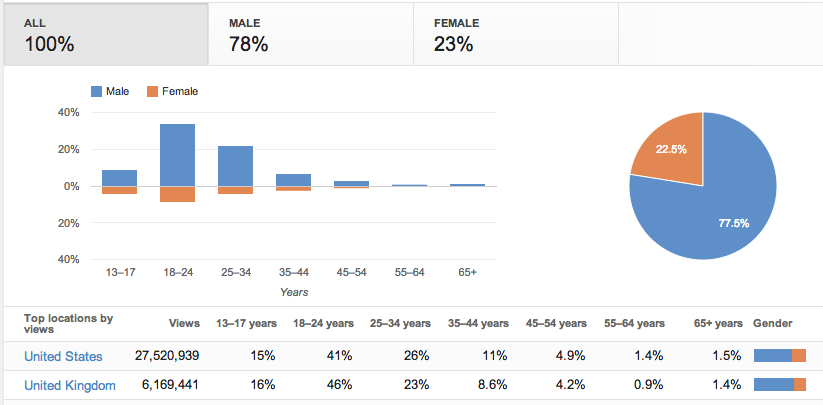
The purpose of YouTube is to entertain, this website is use to watch a range of different videos from cartoons to the news. can be useful for people want to sell their items or people that want to buy seconded hand items. The target audience for this website is 8+ this is because there are many videos aimed a different ages, however explicit videos are blocked for under 18s. Below is an image of the audiences that visit YouTube. As we can see by gender split the amount of males compared to females are higher this could be because there are a lot of gaming video that are popular on this website, these videos will mostly be viewed by males making their statics higher. The social grade of YouTube is Middle class ABC1, I think this because the website is online which means that the audience needs some sort of computing device to view this website. However this website is free to visit so that means that anyone can access this website.
Demographics


B) Visitor Needs
The visitor needs of YouTube is to entertain, this need is met by the website uploading a range of different videos on demand from cartoons to news stories. When the visitors first arrive onto the YouTube website they will be directed to the homepage instantly. On the homepage the visitors can find popular videos or recommended and subscribed videos depending if the visitor is logged on as user. From the homepage the visitors can also visit there channel or a subscribed channel or even upload their own video, this also depends on whether the visitor has an account.

C) Information flow (User Experience)
The  website is quite basic making it easy to navigate within the website, as the search bar can be found in the right side of the header. The search bar is to search for different videos.

D) Features - 100 words
The search bar is at the top right corner of every page,  when searching for a video suggestions of what to type in will drop down which is helpful for quicker searching. There are thumbnail pictures of what is in the videos. 


hen people search for certain news stories it is not going to be too complicated. There are pictures on most pages, this is a way of the audience seeing what it is about without reading the full article, this is the same with the subtitles for each article, this is to save time for the readers as they can find an article they are looking for quicker. In the header of the webpage there is an option to navigate on to a different website to listen to the BBC radio. There are various hyper-links on this webpage which takes the visitors to the different news articles. As well as a radio button there is also a button to navigate just to videos and audios, these are both used for the people who find it easier to watch or listen rather than read which mean it expands the target audience. 
- search bars
- pictures
- text box
- buttons/radio buttons
- hyperlinks
- video - what is it for?
- audio - what is it for?
- Organisation - sections?
- Header/Footer
- Social Features - Anyform of communication
-
 EBenefits

YouTube can also only be found online as it doesn’t have any high street stores. The website lets the audience watch video for things like entertainment or educational reasons. The producer started this website reach a wide audience and allow them audience to stream their own videos worldwide.

F) Content 


This is a screenshot of YouTube in 2005. This website is very basic with a navigation bar which has 5 radio buttons. As this page is quite simple there are no videos that are on the homepage when you first arrive. The YouTube website look like it was originally used as a dating website.

This is a screenshot of YouTube in 2015. This website no longer has the basic look as it looks more complex, however the website is still easy to use and maybe even easier than before. When the users first arrive on the homepage they are given a choice of recommended videos so if the users are wanting to watch similar videos to when they were last active, they can just  click on the recommended videos without having to search.