 |
| https://www.youtube.com/ |
The purpose of YouTube is to entertain, this website is use to watch a range of different videos from cartoons to the news. can be useful for people want to sell their items or people that want to buy seconded hand items. The target audience for this website is 8+ this is because there are many videos aimed a different ages, however explicit videos are blocked for under 18s. Below is an image of the audiences that visit YouTube. As we can see by gender split the amount of males compared to females are higher this could be because there are a lot of gaming video that are popular on this website, these videos will mostly be viewed by males making their statics higher. The social grade of YouTube is Middle class ABC1, I think this because the website is online which means that the audience needs some sort of computing device to view this website. However this website is free to visit so that means that anyone can access this website.
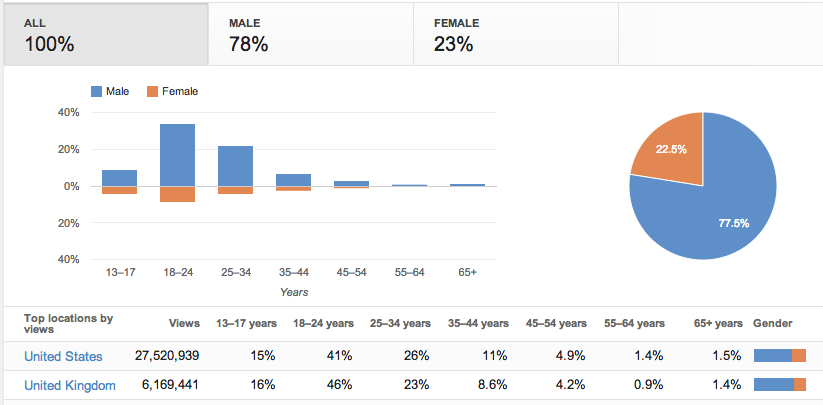
The visitor needs of YouTube is to entertain, this need is met by the website uploading a range of different videos on demand from cartoons to news stories. When the visitors first arrive onto the YouTube website they will be directed to the homepage instantly. On the homepage the visitors can find popular videos or recommended and subscribed videos depending if the visitor is logged on as user. From the homepage the visitors can also visit there channel or a subscribed channel or even upload their own video, this also depends on whether the visitor has an account.
C) Information flow (User Experience)
The website is quite basic making it easy to navigate within the website, as the search bar can be found in the right side of the header. The search bar is to search for different videos.
D) Features - 100 words
The search bar is at the top right corner of every page, when searching for a video suggestions of what to type in will drop down which is helpful for quicker searching. There are thumbnail pictures of what is in the videos.
hen people search for certain news stories it is not going to be too complicated. There are pictures on most pages, this is a way of the audience seeing what it is about without reading the full article, this is the same with the subtitles for each article, this is to save time for the readers as they can find an article they are looking for quicker. In the header of the webpage there is an option to navigate on to a different website to listen to the BBC radio. There are various hyper-links on this webpage which takes the visitors to the different news articles. As well as a radio button there is also a button to navigate just to videos and audios, these are both used for the people who find it easier to watch or listen rather than read which mean it expands the target audience.
- search bars
- pictures
- text box
- buttons/radio buttons
- hyperlinks
- video - what is it for?
- audio - what is it for?
- Organisation - sections?
- Header/Footer
- Social Features - Anyform of communication
-
E) Benefits
YouTube can also only be found online as it doesn’t have any
high street stores. The website lets the audience watch video for things like entertainment
or educational reasons. The producer started this website reach a wide audience
and allow them audience to stream their own videos worldwide.
F) Content

This is a screenshot of YouTube in 2005. This website is very basic with a navigation bar which has 5 radio buttons. As this page is quite simple there are no videos that are on the homepage when you first arrive. The YouTube website look like it was originally used as a dating website.

This is a screenshot of YouTube in 2015. This website no longer has the basic look as it looks more complex, however the website is still easy to use and maybe even easier than before. When the users first arrive on the homepage they are given a choice of recommended videos so if the users are wanting to watch similar videos to when they were last active, they can just click on the recommended videos without having to search.
F) Content

This is a screenshot of YouTube in 2005. This website is very basic with a navigation bar which has 5 radio buttons. As this page is quite simple there are no videos that are on the homepage when you first arrive. The YouTube website look like it was originally used as a dating website.

This is a screenshot of YouTube in 2015. This website no longer has the basic look as it looks more complex, however the website is still easy to use and maybe even easier than before. When the users first arrive on the homepage they are given a choice of recommended videos so if the users are wanting to watch similar videos to when they were last active, they can just click on the recommended videos without having to search.

No comments:
Post a Comment